> ## Documentation Index
> Fetch the complete documentation index at: https://docs.immutable.com/llms.txt
> Use this file to discover all available pages before exploring further.
# Funnel Page
> High-conversion pre-launch landing page that feeds Audience CDP and Attribution
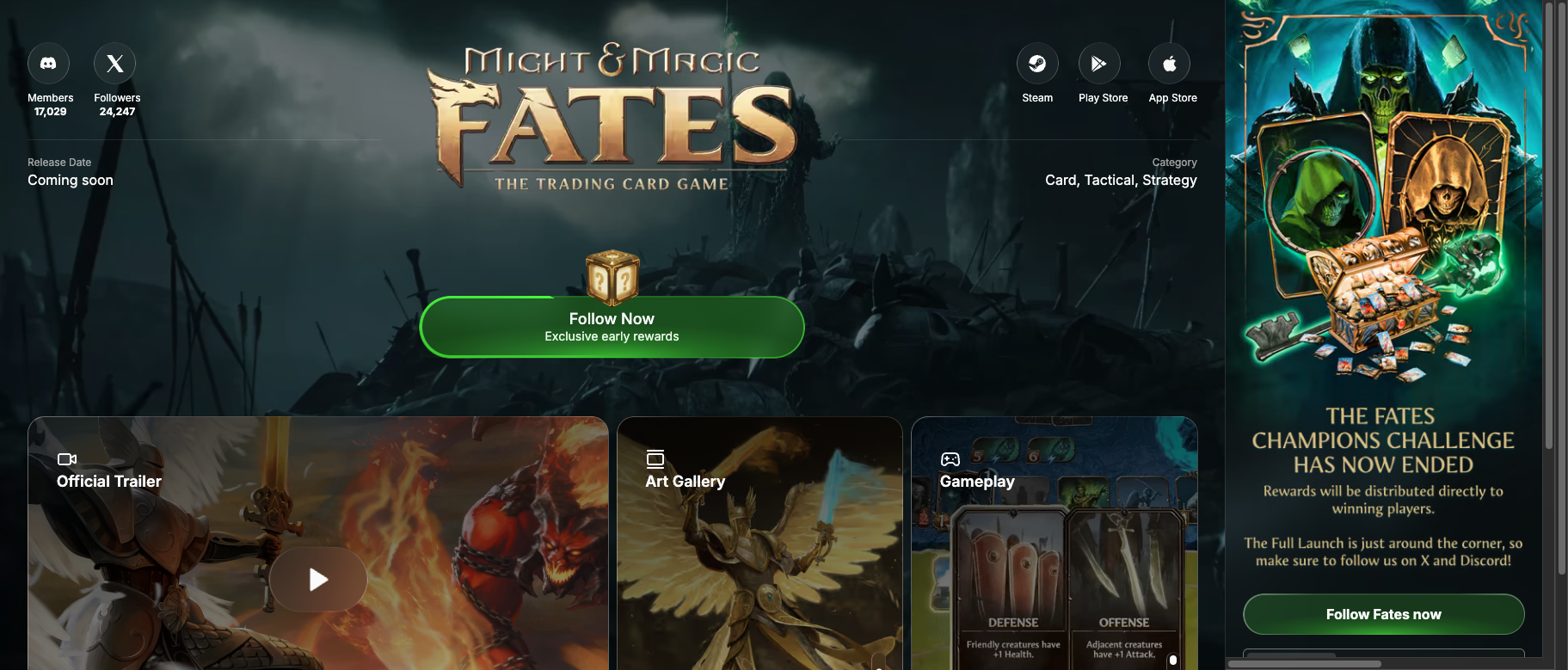 A Funnel Page is a dedicated landing experience on [Immutable Play](https://play.immutable.com). For **Steam games**, it sits beside the wishlist button: Steam still owns the store wishlist; you own a contactable audience you can nurture with [Engage](/docs/products/audience/engage) until (and after) launch.
Signups, links, referrals, and quests write into [Audience CDP](/docs/products/audience/overview) so Engage, [Analytics](/docs/products/audience/analytics/overview), and [Attribution](/docs/products/attribution/overview) share the same profiles.
See a live Funnel Page in action
## How it fits
| Product | Role of the Funnel Page |
| ------------------- | ------------------------------------------------------------------------------------------------- |
| **Attribution** | Destination for paid and organic traffic you want to measure |
| **Audience CDP** | Automatic [ingestion](/docs/products/audience/ingestion) of signups, links, referrals, and quests |
| **Engage** | Lifecycle messaging against those signups |
| **Play / Questing** | Quests and rewards on the page itself |
You do not need a separate marketing-site pixel for Funnel Page traffic. For your own site or game client, add SDKs via Attribution / Ingestion.
## Why use one (especially with Steam)
| Steam wishlist / store page alone | Funnel Page + wishlist |
| --------------------------------- | -------------------------------------- |
| Anonymous intent on Steam | Known players in your CDP |
| Only Valve can email them | You message via Engage |
| Static store content | Quests, rewards, leaderboards |
| Weak referral loops | Built-in referrals |
| UA optimizes for wishlists only | Attribution can track signup → install |
Keep the Steam wishlist CTA. Add the Funnel Page so paid and organic traffic also create an owned profile.
## How it works
Send paid and organic traffic to your Funnel Page instead of only Steam or your site
Players create accounts, complete quests, earn rewards, and climb leaderboards
Linked accounts and activity become Audience profiles
Referrals and multi-channel engagement expand reach
Convert engaged players into Day 1 actives
## Features
Unlock content as players follow, engage, and refer friends
Social tasks and community challenges. See [Questing](/docs/products/play/questing).
Rankings and rewards for top fans
Connect Discord, X, Telegram, and more
## Reward tiers
| Tier | Unlock condition | Example rewards |
| ---------- | ------------------------- | ---------------------------------- |
| **Tier 1** | Follow on Play | First reward crate, basic cosmetic |
| **Tier 2** | Complete engagement tasks | Exclusive items, early access |
| **Tier 3** | Top community member | VIP access, founder rewards |
## Page components
* **Hero** — Branding, trailer, countdown, platform availability
* **Art gallery** — Screenshots and concept art
* **Community** — Fan count, tier progress, quests, leaderboards
* **Profiles** — Display names and cross-game identity on Play
## Acquisition multiplier
```
Traditional: 1000 clicks → 200 wishlists → 40 Day 1 players
Funnel Page: 1000 clicks → 200 signups → referrals + retention → more Day 1 players
```
Gains come from higher click-to-signup conversion, referrals, re-engagement, and multi-channel follow-up via Engage.
## Setup
Configure in [Hub](https://hub.immutable.com): branding, reward tiers, quests, social channels, and layout. Managed custom design is available through Immutable's team.
Set up your page in Hub
Live Funnel Pages on Immutable Play
## Pre-launch metrics
| Metric | Description |
| ------------------- | ------------------------------- |
| **Signups** | Players on your Funnel Page |
| **Conversion rate** | Visitors → signups |
| **Referral rate** | Signups from referrals |
| **Engagement** | Quest completion, return visits |
| **Tier mix** | Players at each reward tier |
Deeper cohort and quality views live in [Audience Analytics](/docs/products/audience/analytics/overview). Source performance lives in [Attribution](/docs/products/attribution/overview).
## Next steps
Measure campaigns that drive Funnel Page traffic
How Funnel Page data enters the CDP
Nurture Funnel Page signups
Quests and rewards on the page
A Funnel Page is a dedicated landing experience on [Immutable Play](https://play.immutable.com). For **Steam games**, it sits beside the wishlist button: Steam still owns the store wishlist; you own a contactable audience you can nurture with [Engage](/docs/products/audience/engage) until (and after) launch.
Signups, links, referrals, and quests write into [Audience CDP](/docs/products/audience/overview) so Engage, [Analytics](/docs/products/audience/analytics/overview), and [Attribution](/docs/products/attribution/overview) share the same profiles.
See a live Funnel Page in action
## How it fits
| Product | Role of the Funnel Page |
| ------------------- | ------------------------------------------------------------------------------------------------- |
| **Attribution** | Destination for paid and organic traffic you want to measure |
| **Audience CDP** | Automatic [ingestion](/docs/products/audience/ingestion) of signups, links, referrals, and quests |
| **Engage** | Lifecycle messaging against those signups |
| **Play / Questing** | Quests and rewards on the page itself |
You do not need a separate marketing-site pixel for Funnel Page traffic. For your own site or game client, add SDKs via Attribution / Ingestion.
## Why use one (especially with Steam)
| Steam wishlist / store page alone | Funnel Page + wishlist |
| --------------------------------- | -------------------------------------- |
| Anonymous intent on Steam | Known players in your CDP |
| Only Valve can email them | You message via Engage |
| Static store content | Quests, rewards, leaderboards |
| Weak referral loops | Built-in referrals |
| UA optimizes for wishlists only | Attribution can track signup → install |
Keep the Steam wishlist CTA. Add the Funnel Page so paid and organic traffic also create an owned profile.
## How it works
Send paid and organic traffic to your Funnel Page instead of only Steam or your site
Players create accounts, complete quests, earn rewards, and climb leaderboards
Linked accounts and activity become Audience profiles
Referrals and multi-channel engagement expand reach
Convert engaged players into Day 1 actives
## Features
Unlock content as players follow, engage, and refer friends
Social tasks and community challenges. See [Questing](/docs/products/play/questing).
Rankings and rewards for top fans
Connect Discord, X, Telegram, and more
## Reward tiers
| Tier | Unlock condition | Example rewards |
| ---------- | ------------------------- | ---------------------------------- |
| **Tier 1** | Follow on Play | First reward crate, basic cosmetic |
| **Tier 2** | Complete engagement tasks | Exclusive items, early access |
| **Tier 3** | Top community member | VIP access, founder rewards |
## Page components
* **Hero** — Branding, trailer, countdown, platform availability
* **Art gallery** — Screenshots and concept art
* **Community** — Fan count, tier progress, quests, leaderboards
* **Profiles** — Display names and cross-game identity on Play
## Acquisition multiplier
```
Traditional: 1000 clicks → 200 wishlists → 40 Day 1 players
Funnel Page: 1000 clicks → 200 signups → referrals + retention → more Day 1 players
```
Gains come from higher click-to-signup conversion, referrals, re-engagement, and multi-channel follow-up via Engage.
## Setup
Configure in [Hub](https://hub.immutable.com): branding, reward tiers, quests, social channels, and layout. Managed custom design is available through Immutable's team.
Set up your page in Hub
Live Funnel Pages on Immutable Play
## Pre-launch metrics
| Metric | Description |
| ------------------- | ------------------------------- |
| **Signups** | Players on your Funnel Page |
| **Conversion rate** | Visitors → signups |
| **Referral rate** | Signups from referrals |
| **Engagement** | Quest completion, return visits |
| **Tier mix** | Players at each reward tier |
Deeper cohort and quality views live in [Audience Analytics](/docs/products/audience/analytics/overview). Source performance lives in [Attribution](/docs/products/attribution/overview).
## Next steps
Measure campaigns that drive Funnel Page traffic
How Funnel Page data enters the CDP
Nurture Funnel Page signups
Quests and rewards on the page